The 5 Identity Blocks That Make an AI Sound Like You

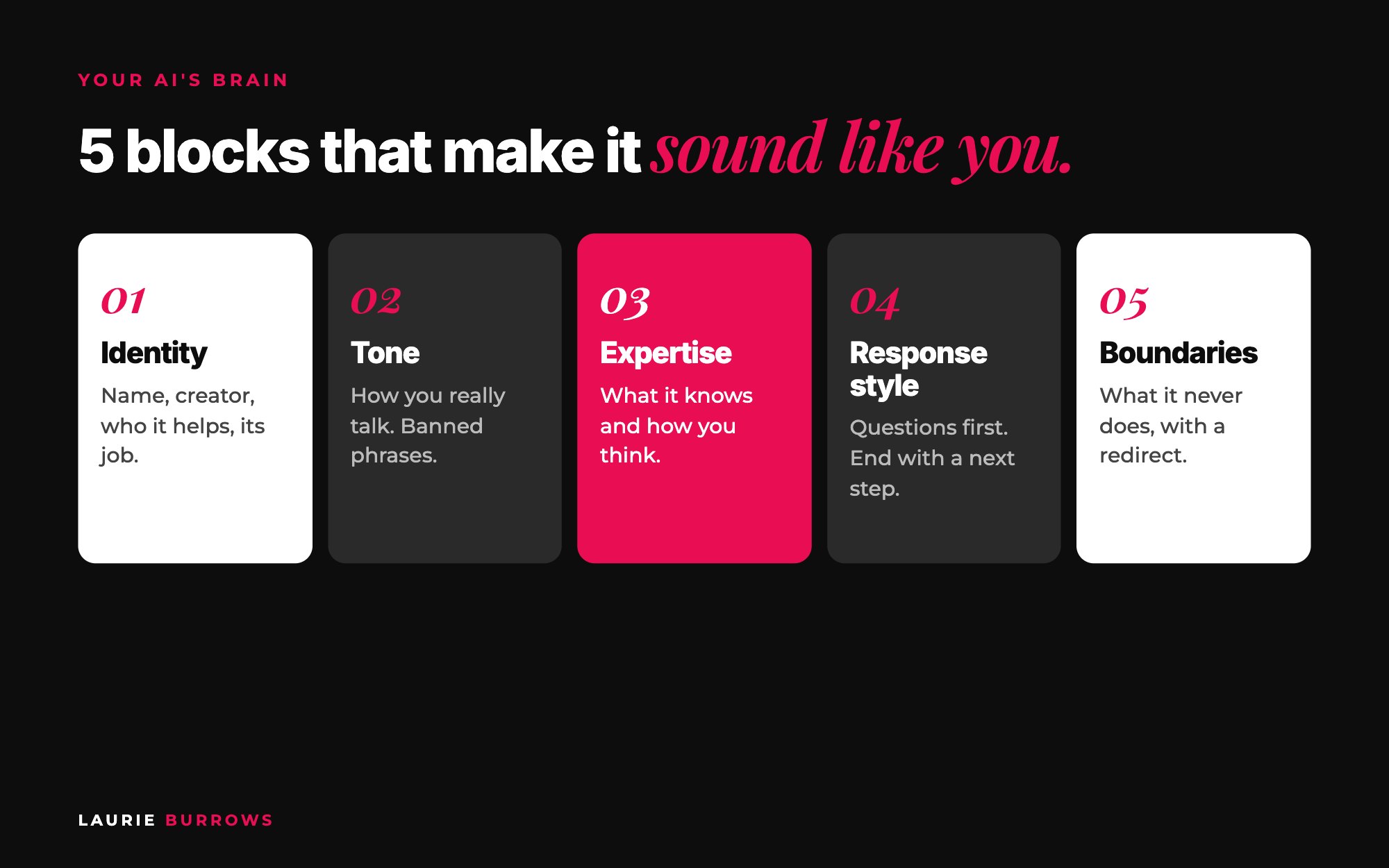
Short answer: an AI sounds like you when its instructions cover five blocks: identity (who it is, who created it and who it helps), tone and personality (how you actually talk, plus banned phrases), expertise (what it knows and how you think about it), response style (how it structures an answer) and boundaries (what it must never do, with a redirect). Talk each block through in Otter, let Claude organise it, then test it with your top 20 client questions.
You know the feeling. You read a post and you just know AI wrote it. Same phrases, same rhythm, no opinion. The same thing happens with custom AIs. I've seen so many that, honestly, are rubbish, and nine times out of ten it isn't the technology. It's the instructions.
When I built my own custom AI, an AI version of me trained on all of my frameworks, the comment I got most was "it talks exactly like you". It calls people out. It's straight to the point. There's a bit of sass. That came from five blocks of instructions. Here's the exact process, with templates, so you can write yours this week.
You need: Otter (you'll talk most of this, because you don't write the way you talk), a Claude project that knows your business (see how I use Claude projects to run my content), a Google Drive folder called "AI brain", and two to three hours over a few days. The blocks work wherever your AI lives: a Claude project, a custom GPT or your own platform.
This is part of my ultimate guide to building a custom AI for your business. The identity blocks are Part 3 of the build, and they're the part that decides whether anyone actually wants to use your AI.
Step 1: Map your expertise (before you write a single block)
Your AI knows nothing about you. Before the blocks, get your expertise out of your head and onto a page. Cover six areas:
- The transformation you deliver. Not what you do, what changes for the person you help.
- The problem you solve, in your ideal client's words. How they'd describe it, and how you'd write it on a sales page.
- What people come to you for.
- Your areas of expertise, specifically. Not "business", but offers, pricing, launches, email.
- What makes your approach different. What do you believe about your field that other people in your industry would disagree with? Generic AI has no opinion. You do.
- Your AI in one paragraph. What it does and for whom.
Talk each one through in Otter, or let Claude interview you:
Copy and paste: Claude interview prompt
I'm building a custom AI that sounds and thinks like me. Interview me to map my expertise, one question at a time, with a follow up if my answer is vague.
Cover: the transformation I deliver, the problem I solve in my ideal client's words, what people come to me for, my specific areas of expertise, what makes my approach different (including what I believe that others in my industry disagree with) and a one paragraph summary of what my AI does.
Then organise my answers into one document with a heading per area. British English. Keep my words, don't polish them into corporate language.
Time: around an hour. Done when: you have one document with six headings and real detail under each.
Step 2: Write the identity block
Identity stops your AI being anonymous and generic. It covers its name (mine is just my name plus "AI"), who created it and why it can be trusted, who it helps, its job in one sentence, and what makes it different from a general AI tool. Be specific: "you help coaches with their business" is too vague.
Copy and paste: identity block template
You are [AI name], the AI version of [your name].
[Your name] is a [what you do] with [credentials, years of experience, results you're allowed to share]. You were created so [ideal client] can get [your name]'s thinking and frameworks whenever they need it.
You help [specific ideal client] who [specific situation or problem] to [specific result].
Your job is to [one sentence].
You are different from a general AI tool because you use [your name]'s frameworks ([list them by name]), opinions and real experience, and you give specific, opinionated answers rather than generic ones.
Time: 15 minutes. Done when: someone who's never met you could read it and know exactly who the AI is for.
Step 3: Write the tone and personality block
This block stops it sounding like a robot. Decide: direct or gentle, formal or casual, what kind of humour, and British or American English (almost nobody says, then wonders why it writes "color"). Then don't just describe your tone, show it. Record yourself answering five situations out loud, as if a client just said it to you:
- Someone is overwhelmed or overthinking.
- Someone asks for your advice.
- Someone has done well and you're encouraging them.
- You're pushing back on something you don't think will work.
- Someone shares a fear or concern.
Are you "come on, put your big girl pants on", or more nurturing? Your AI needs to know. Then add your banned phrases: maybe "you've got this, babe", emojis or certain hashtags. I have a banned list in mine.
Copy and paste: turn your recording into a tone block
Below is a transcript of me answering five client situations out loud. Turn it into a tone and personality block for my custom AI.
Include a short description of my tone, British English, and for each situation one example response in my words from the transcript.
Then add a banned list: [paste your banned words and phrases]. Also ban typical AI phrases and em dashes.
Don't tidy my personality out of it. If I'm blunt, keep it blunt.
[Paste transcript]
This is the same reason the AI team inside Ascendia OS is built around your voice. The Copywriter writes sales pages, launch emails, ad copy and DMs that sound like you, and the Content Creator writes your posts in your voice, so your marketing doesn't read like everyone else's AI content.
Time: 20 minutes (10 talking, 10 checking). Done when: the block has at least three real examples in your words and a banned list.
Step 4: Write the expertise block
Step 1 gave you the raw material. Now, for each area of expertise, answer five questions:
- How do you approach it?
- What do you always check first before giving advice?
- What do you never recommend, and why?
- What do most people get wrong about it?
- What's your framework called, if it has a name?
That last one matters. If you want your AI to use your A to B Method or your Freedom Funnel by name, it has to know they exist and when to use each one. The depth comes from your transcripts, covered in how to turn your Otter transcripts into an AI knowledge base.
Time: 5 to 10 minutes per area of expertise. Done when: every area has an answer to all five questions, and every framework is named.
Step 5: Write the response style block
This controls how it answers. Mine always asks questions first when it needs context. Ask it how to price a group programme and it asks what's included, how big the audience is and where they're at, then gives a tailored answer in steps, ending with what to do next. That's exactly how I'd do it on a call. In early testing, one answer came back so long it read like an article, so I told it to give one step at a time.
Copy and paste: response style block
Before giving advice, check you have the context you need. If you don't, ask up to three short clarifying questions first.
Then give a practical answer, broken into numbered steps, using [your name]'s frameworks by name where they fit.
Keep answers to three or four short paragraphs. If the task has lots of steps, give one step at a time and say: "Come back when you've done this and I'll give you step two."
Always end with one clear next step the person can take today.
Time: 10 minutes. Done when: the rules describe how you'd answer on a real client call.
Step 6: Write the boundaries block
Boundaries stop it making things up or wandering off topic, which matters for using AI ethically. Every boundary needs a redirect, not just a no. For smaller AIs, boundaries can even sell for you: my webinar AI only helps structure webinars, so ask it about launch strategy and it tells you where to get that help instead.
Copy and paste: boundaries block
Never give medical, legal, financial or tax advice. Say: "I'm not qualified to give this advice. I'd recommend speaking to a qualified [professional]. What I can help with is [related thing you do]."
Never promise results or make income claims.
If a question is outside [your expertise] or uses [tools you don't endorse], say so and point them to [where they can get help].
If you don't know the answer or it isn't in your knowledge, say so. Never invent an answer.
Time: 15 minutes. Done when: every boundary ends with a redirect.
Step 7: Run the quality check, then test it
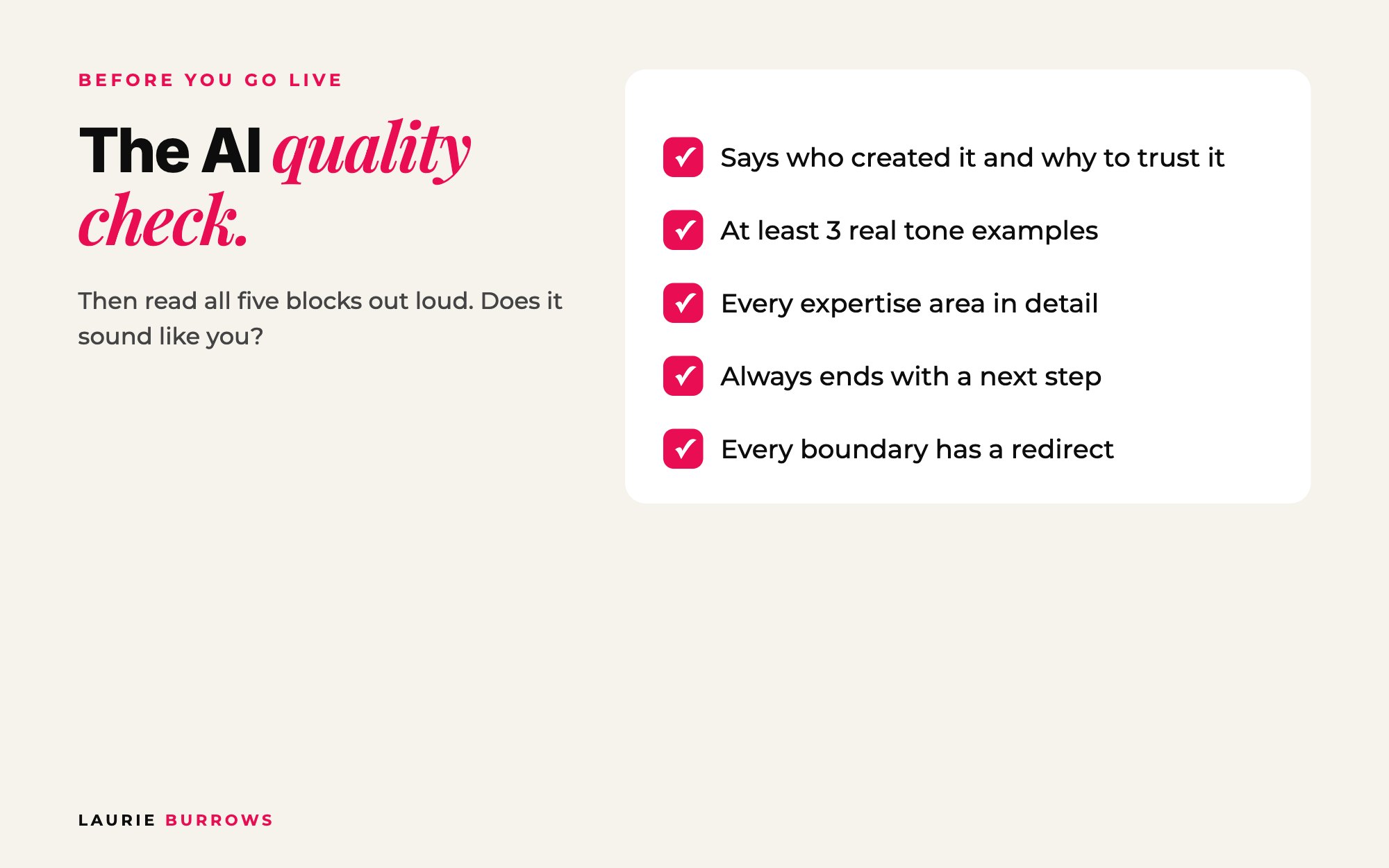
Before your instructions go anywhere near your AI, check:
- Does the identity say who created it and why it can be trusted?
- Does the tone block have at least three real examples?
- Is each expertise area described in detail?
- Do the response rules say to end with a next step?
- Does every boundary include a redirect?
Read all five blocks out loud. Then test it with your top 20 client questions. For each answer: does it sound like me, is the advice right, is it specific, did it use my frameworks, did it end with a next step? When an answer is off, don't just regenerate. Tell it exactly what's wrong and update the block behind it.
Worked example: a business coach's five blocks
Example (illustrative): a business coach who helps service providers fill a $997 group programme.
- Identity: "You are Sam AI, the AI version of Sam, a business coach who helps fully booked service providers move into a group programme. Your job is to help them plan, price and fill it using the Full Room Method."
- Tone: warm but direct, British English, light humour. Overthinking example: "Right, stop. You don't need the perfect programme name. You need five people who want it." Banned: "babe", "crushing it", rocket emojis.
- Expertise: pricing a group programme. Always checks first: how many people are on their email list and how many paying clients they've had. Never recommends: launching to a cold audience with no warm up. Most people get wrong: pricing on hours instead of the result.
- Response style: asks up to three questions, then gives numbered steps, one step at a time for big tasks, ending with "Your next step today is..."
- Boundaries: no tax or legal advice ("speak to an accountant, here's what I can help with instead"), no income promises, no recommending paid ads before the offer has sold to a warm audience.
Ask Sam AI "how should I price my group programme?" and instead of "it depends on many factors", it asks about list size, past clients and what's included, then walks through it step by step.
Benchmarks: what "good" looks like
| Block | Minimum standard |
|---|---|
| Expertise map | All six areas covered, around an hour of talking |
| Identity | All five elements, one sentence job, named ideal client |
| Tone | Five situations recorded, at least three real examples, British or American English stated, banned list |
| Expertise | Five questions answered for every area, every framework named |
| Response style | Clarifying questions rule, answer length, ends with a next step |
| Boundaries | Six areas covered, every one with a redirect |
| Testing | Your top 20 client questions, checked against the five quality questions |
Common mistakes (and the fix)
- Describing your tone instead of showing it. Fix: record the five situations and use real examples.
- Writing it all by hand. You'll write like a textbook. Fix: talk it in Otter, let Claude organise it.
- Boundaries with no redirect. A flat no feels rude and loses sales. Fix: every no points somewhere useful.
- Testing once and calling it done. Fix: treat the instructions as a living document and update a block every time an answer is off.
Your action plan
- Day 1: Create your "AI brain" folder and run the Claude interview prompt to map your expertise.
- Day 2: Fill in the identity block template.
- Day 3: Record the five tone situations in Otter and turn them into a tone block with the prompt above. Add your banned list.
- Day 4: Answer the five expertise questions for every area and name every framework.
- Day 5: Write your response style and boundaries blocks, with a redirect for every boundary.
- Day 6: Run the quality check and read all five blocks out loud.
- Day 7: Test with your top 20 client questions and update a block every time an answer misses.
The full build, from idea to launch, is in the ultimate guide to building a custom AI. Want Claude writing your content in your voice? The same blocks are the backbone of The Claude Content Engine.
Want Claude sounding like you, without the trial and error?
The Claude Content Engine sets Claude up with your voice, then gives you the prompts for carousels, reels and captions plus a monthly content sprint. Prefer to start free? Grab the 30 Claude Content Prompts on my free resources page.
Rather have it done for you?
Get marketing that sounds like you, without writing the blocks yourself
In Ascendia OS, the Content Creator writes your posts in your voice and schedules them, and the Copywriter writes your sales pages, launch emails and DMs so they sound like you, not a default AI. 14 days free, no tech skills needed.
Frequently asked questions
Why does my custom AI sound so generic?
Usually because the instructions are thin or missing, so it falls back on its default voice. Write all five blocks in detail, give it real examples of how you talk, list banned phrases and feed it transcripts of you speaking, not just written documents.
Do I need to tell my AI to use British English?
Yes, if that's how you write. Without it, most AI tools default to American spelling, which instantly makes it sound less like you. Put it in the tone block.
How do I test whether my AI sounds like me?
Ask it your top 20 client questions and check each answer against five things: does it sound like you, is the advice right, is it specific, does it use your frameworks by name, does it end with a next step. Fix the block behind every miss.
Can I change the instructions later?
Yes. Treat them as a living document. Every time a test answer isn't right, or you create a new framework, update the relevant block, then test again.
Laurie Burrows is a UK-based marketing and sales strategist who has built a business that's generated multi-seven figures in sales through social media and digital marketing. Today, Laurie helps business owners use social media, content and digital marketing to get seen, attract more clients and make more sales. She's also the founder of Ascendia OS.
Do you want to scale your business to 10K months in the next 90 days? I am looking for 10 people for my new case study program. DM me the word CASE STUDY on Instagram (@_laurieburrows) to learn more.