Order Bumps and Upsells for Coaches
Short answer: an order bump is a small, complementary offer (usually $11 to $17) that people add with one tick at checkout. An upsell is a second offer (usually $47 to $97) shown on the next page after they've bought. Together they raise how much each new buyer spends without you finding more buyers, and they can pay for your ads. Keep both closely related to what they're buying, priced as a no brainer, and simple to say yes to. Aim for 70 to 80% of buyers to take the bump.
Most coaches put all their energy into getting more people to buy. That matters. But there's an easier win hiding in your checkout: getting the people who are already buying to spend a little more, on things that genuinely help them.
Order bumps and upsells are two of the simplest additions to any funnel, and once they're set up, they work on every single sale. Here's how to add both this week, with the copy to use.
This is part of my ultimate guide to evergreen funnels. Bumps and upsells are the bit that makes every buyer in that funnel worth more.
Order bump vs upsell: what's the difference?
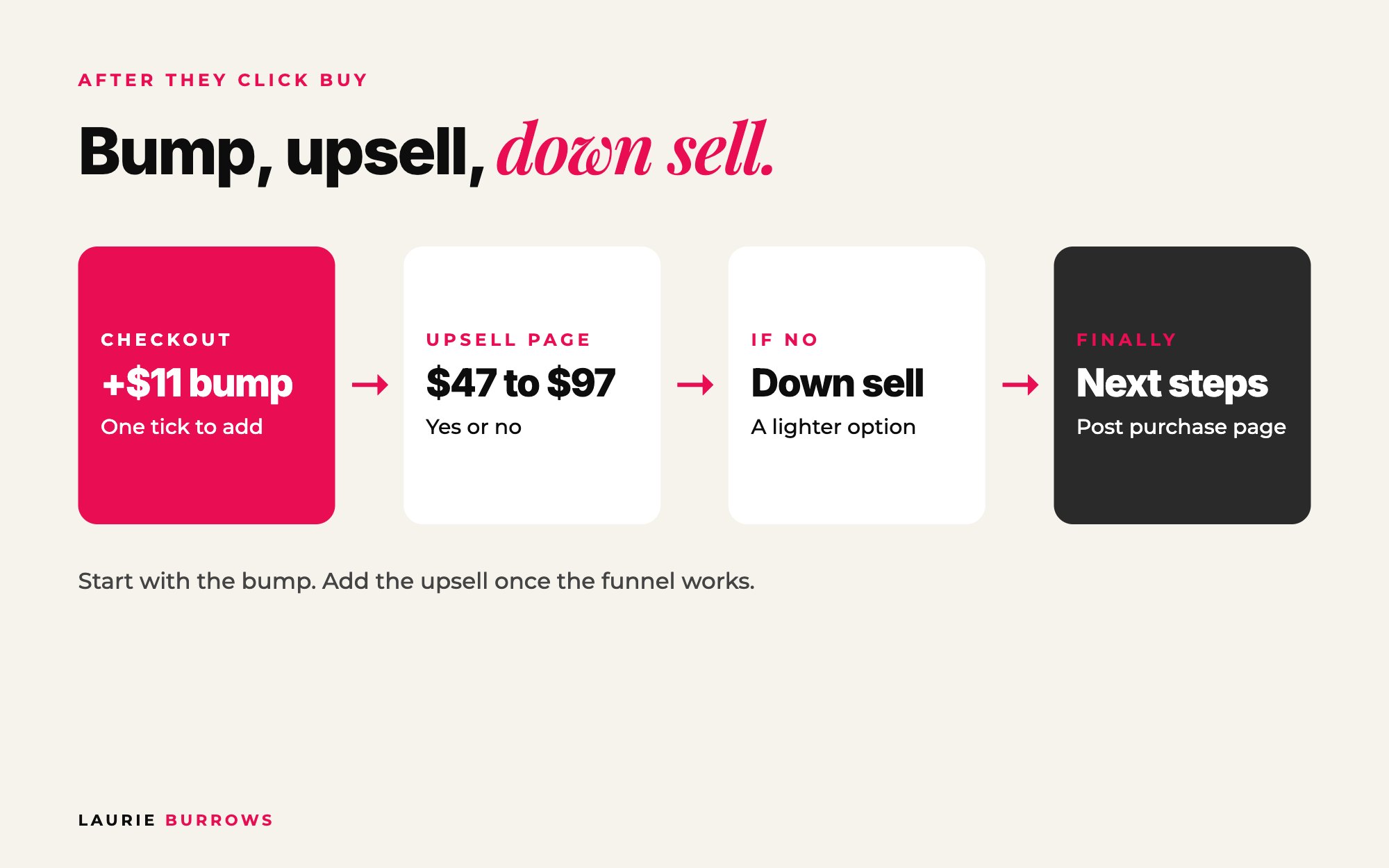
- Order bump: a tick box on the checkout page. "Add this for just $11." One click, same order.
- Upsell: a separate page after someone completes their purchase. "You're in! Want to add this too?" with a yes and a no button.
- Down sell: if they say no to an upsell, a smaller or cheaper alternative.
Why they matter: the maths
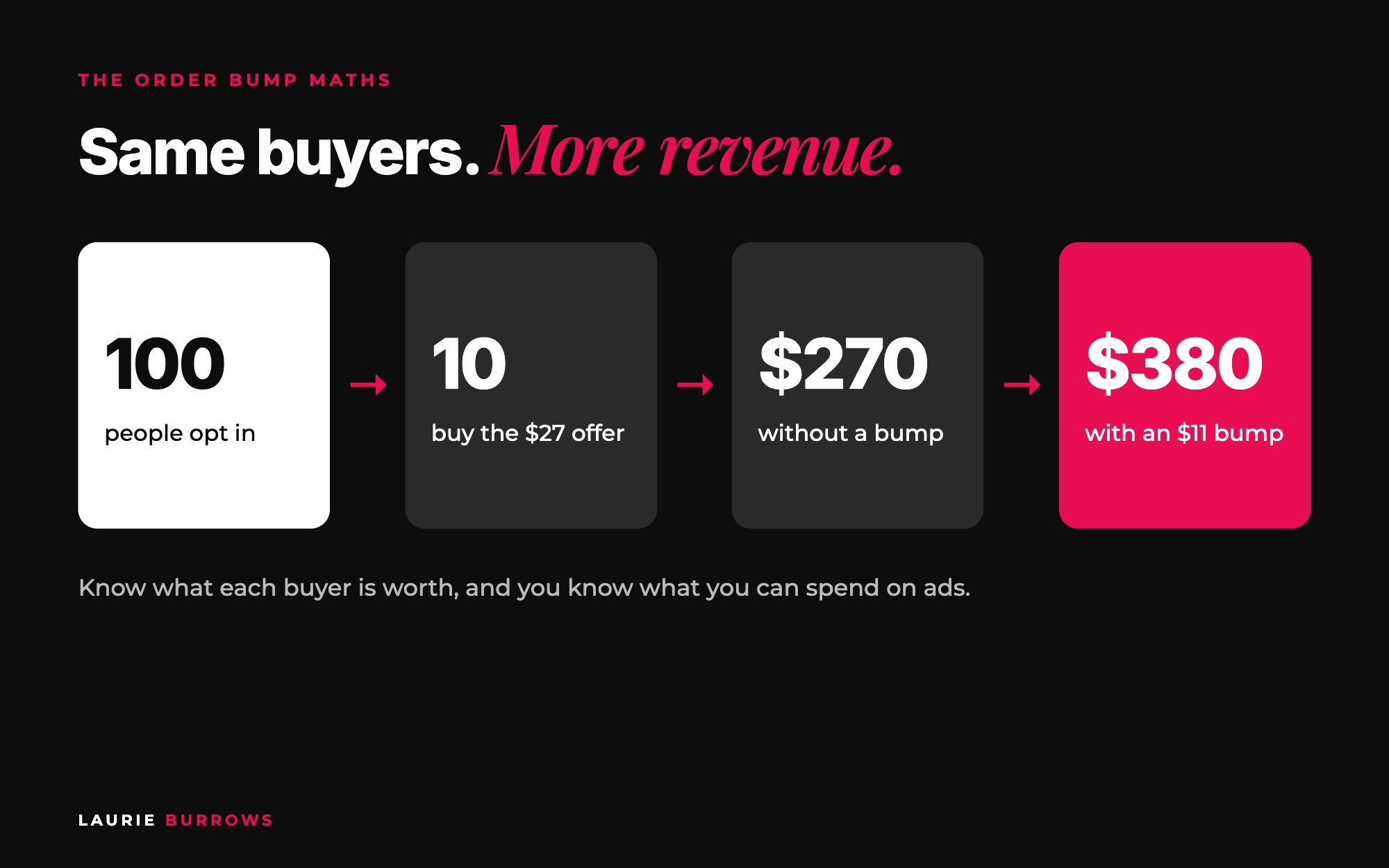
I aim for around 10% of people who opt in to buy the $27 offer on the thank you page. For every 100 opt-ins, that's at least $270. Add an $11 order bump, and if most buyers tick it, those 10 buyers spend $38 each instead of $27. That's $380 for every 100 opt-ins without a single extra buyer. Add a $47 to $97 upsell and it climbs again.
Once you know what each buyer is worth on average, you know how much you can afford to spend on ads. The bump and upsell are what make your ads pay for themselves.
How to add an order bump and upsell, step by step
Step 1: List what you already have
Your best bumps are often already sitting in your business: a recording of a past workshop, a template pack, a swipe file, a checklist. Pre-recorded and pre-created means you sell it again and again without more of your time.
Time: 20 minutes. Done when: you have a list of every template, recording, checklist and mini training you've made.
Step 2: Pick the bump that completes the main offer
The bump should feel like the obvious companion to the main offer, not a random extra. Ask: "What would help them get the result from this faster?" Buying a course on launching? The bump is launch email templates. Buying a webinar training? The bump is the slide templates. My own bump is a short course on ways to bring quick cash into your business, sitting next to offers about building sales systems. Short term cash and long term system. They go together.
Time: 10 minutes. Done when: you can finish the sentence 'People buying X will want Y because...'.
Step 3: Price it at $11 to $17
Lower than the main offer, so it feels like even more of a no brainer. When we added an $11 bump to a paid live masterclass, nearly everyone who bought ticked it. At that price, people don't think twice.
Time: 2 minutes. Done when: the bump price is lower than the main offer.
Step 4: Write short bump copy
One headline, one or two lines on what they get, the price. They've already decided to buy. You're just making the bump an easy yes. Use the template below.
Time: 10 minutes. Done when: your bump copy is under 40 words.
Step 5: Tidy your checkout page
- Don't add new information. The checkout confirms what they're getting: a mock up, the name and a summary. A couple of testimonials can help.
- Offer ways to pay that suit them: card, plus the digital wallets people use on their phones. A one tap payment option can be the difference between a sale and a closed tab.
- Make your terms and refund policy clear at the bottom.
Time: 30 minutes. Done when: you've bought from your own checkout on your phone in under a minute.
If checkouts aren't your thing, the Funnel Builder inside Ascendia OS sets up your checkout with the order bump and upsell already built in, so you only need to add your offer and your copy.
Step 6: Add one upsell (once the funnel is live)
After payment, show one more offer, usually $47 to $97 and closely related, with two clear buttons: "Yes, add this" and "No thanks, skip this". A no costs you nothing. Don't build four or five offers before your funnel is even live. You'll get overwhelmed and build nothing. Start with the thank you page offer and the bump, then add the upsell.
Time: Half a day. Done when: the upsell page shows after payment and both buttons work.
Step 7: Track for 30 days, then add a down sell
Track bump take-up and upsell take-up. Once both are steady, you can add a down sell: if someone says no to the upsell, show a smaller or cheaper version before they land on the post purchase page.
Time: 10 minutes a week. Done when: you know your average spend per buyer.
Copy-and-paste: order bump and upsell copy
Copy and paste: order bump
Tick box: Yes! Add [bump name] for just $11
Description: Get the [templates/recording/checklist] I use to [result], so you can [do the main offer faster]. Normally $[value]. Only available on this page.
Copy and paste: upsell page
Headline: You're in! Before you go, want to [bigger result] even faster?
Sub headline: [Upsell name] gives you [what it is] so you can [result] in [timeframe].
Inside: [item 1], [item 2], [item 3].
Price: Add it now for $47 (it won't be offered at this price again).
Yes button: Yes, add this to my order
No button: No thanks, take me to my purchase
Worked example: one funnel, three price points
Example (illustrative numbers): a social media coach gets 1,000 opt-ins a month and 10% buy her $27 thank you page offer.
| Buyers | Revenue | |
|---|---|---|
| $27 offer | 100 | $2,700 |
| $11 order bump (75% of buyers) | 75 | $825 |
| $67 upsell (15% of buyers) | 15 | $1,005 |
| Total | 100 buyers | $4,530, or $45.30 per buyer |
Without the bump and upsell, each buyer is worth $27. With them, each buyer is worth about $45. If it costs her $30 in ads to get a buyer, the first version loses money and the second makes it.
Benchmarks
| What | Aim for |
|---|---|
| Thank you page $27 offer | 8 to 10% of opt-ins |
| Order bump price | $11 to $17 |
| Order bump take-up | 70 to 80% of buyers |
| Upsell price | $47 to $97 |
| Front end per buyer | $27 + $11 = $38 before any upsell |
Common mistakes (and the fix)
- A random bump. Fix: it must help them get the main result faster.
- A bump priced higher than the main offer. Fix: $11 to $17, always lower.
- Long bump copy. Fix: one headline, two lines, a price.
- Building five upsells before launch. Fix: thank you page offer and bump first, upsell later.
- A messy checkout. Fix: no new information, payments that work on a phone, clear terms.
Upsells beyond the low priced offer
- A VIP upgrade on your core offer: more speed, access or personalisation, like done for you support, extra calls or one to one time.
- A VIP upgrade on free events. I recommend one for everything you do. For cold audiences, keep it low: a $17 VIP upgrade sold three times as many as a $27 one did in my next launch.
- A down sell for people who don't buy your core offer: a lighter, self led version that still leads to the core offer later.
If you're building a VIP tier, how to build a value stack will help.
Your action plan
- Day 1: List everything you've already created and pick your bump.
- Day 2: Write the bump copy and add it to checkout at $11 to $17.
- Day 3: Tidy your checkout and test it on your phone.
- Day 4 to 5: Choose your upsell and build the upsell page.
- Day 6: Run a test purchase all the way through.
- Day 7: Switch it on and note your starting numbers.
- Next 30 days: Track bump and upsell take-up weekly and work out your average spend per buyer.
The bump and upsell sit right after your thank you page offer. To see the whole system from opt-in page to core offer, read the ultimate guide to evergreen funnels, or get every template I use inside Content To Clients®.
Want the full funnel, bumps and upsells included?
Content To Clients® is my full system for turning content into repeat sales: the free training, $27 offer, order bump, emails and every template. For coaches, consultants and online service providers who want every buyer to be worth more.
Rather have it done for you?
Let Ascendia OS build your checkout, bump and upsell
The Funnel Builder sets up your checkout, order bump and upsell page inside your account, and the Copywriter writes the bump and upsell copy in your voice. 14 days free, no tech skills needed.
Frequently asked questions
What is a good order bump price?
Between $11 and $17 has worked best for me, and lower than the main offer it's attached to. It should feel like an easy add-on, not a second decision.
What percentage of buyers take an order bump?
A good, relevant bump at $11 to $17 can be taken by 70 to 80% of buyers. If yours is much lower, make it more closely related to the main offer or simplify the copy.
What should I offer as an order bump?
Something that complements the main purchase and helps them get results faster: templates, a swipe file, a short training or a past workshop recording. Pre-recorded or pre-created works best.
What is the difference between an upsell and an order bump?
An order bump is a tick box added on the checkout page before payment. An upsell is a separate offer shown on a new page after payment, with a yes or no button.
Do I need an upsell to start?
No. Start with your thank you page offer and an order bump. Once your funnel is live and working, add an upsell, then a down sell if you want to go further.
Laurie Burrows is a UK-based marketing and sales strategist who has built a business that's generated multi-seven figures in sales through social media and digital marketing. Today, Laurie helps business owners use social media, content and digital marketing to get seen, attract more clients and make more sales. She's also the founder of Ascendia OS.
Do you want to scale your business to 10K months in the next 90 days? I am looking for 10 people for my new case study program. DM me the word CASE STUDY on Instagram (@_laurieburrows) to learn more.